Never miss a deadline. Never lose track.
ZenWorkflow keeps workflows, clients, time, invoicing and AML/KYC checks in one system, so your practice stops running on spreadsheets, shared inboxes and six different logins.



See It In Action
A short walkthrough of workflows, time tracking, invoicing and AML/KYC checks, the way your team would use them day to day.
All your client information in one place.
Engagements, hours, invoices, documents and AML files all hang off the same client record. Your team stops re-typing and starts finding.

One client record your whole team trusts
Keep every client's details in one organised place. Every engagement and invoice you ever run, contacts, group structures, documents on a single record. Add the custom fields your practice needs and find anyone in seconds.
- Full engagement, time and invoice history
- Custom fields you can filter by
- Contacts and group structure in one view
- Saved filtered views for the staff

Know what is open, what is late and who it is waiting on

Set the service up once. Run it a thousand times. Every audit, VAT return or annual filing follows the same steps, so nothing depends on one person remembering. Budgets sit beside actual hours, and status is visible without asking.
- Recurring workflows and deadlines created
- Budgeted hours and fees against actuals
- Track every workflow to completion
- Multi-user assignments with controlled access.
- Comments and activity on every workflow

Built-in compliance that protects your practice
Run PEP, sanctions and adverse media searches, score risk with your own questionnaire and track document expiry, all against the client record your team already works in. When the regulator asks, the audit trail is already there.
- Risk questionnaires and rating scales you define
- PEP, sanctions and adverse media screening
- KYC document collection with expiry reminders
- Share client profiles for easy completion
- Full audit trail and reporting

Bill every hour you worked, and know which ones you didn't
Pick a client, see every unbilled hour and expense, choose what goes on the invoice, send it. Fixed fees, hourly rates and hybrids all work the same way.
- Automated time-to-invoice conversion
- Hourly, fixed-fee and hybrid billing
- Estimates that convert to invoices
- Credit notes, receipts and statements of account
- Track invoiced vs. paid status per workflow

Plan the busy season around who is actually here
Staff request leave, managers approve it, and balances, public holidays and work schedules update themselves. Leave appears in timesheets and capacity, so planning around it takes no extra work.
- Leave requests with manager approval
- Shared team calendar with live balances
- Leave types, allowances and accruals you configure
- Public holidays and work schedules built in
- Leave reflected in timesheets and capacity
Everything your practice needs, in one place
Every feature in ZenWorkflow is built to solve a real operational challenge. Whether you’re tracking time, managing leave, reviewing reports, or coordinating your team, everything works together to give you complete visibility over your practice.
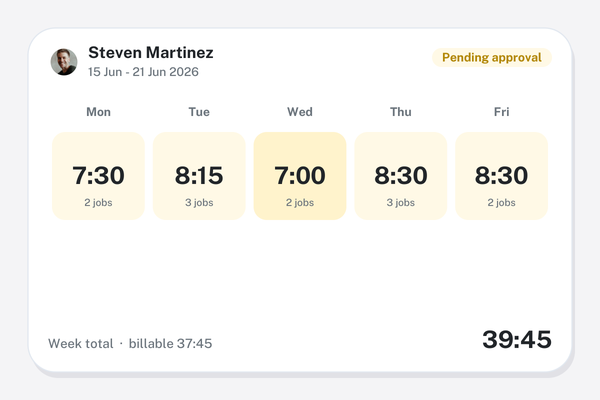
Time Tracking
Log hours against a client, service and workflow. Weekly timesheets go to a manager for approval, so every billable hour reaches an invoice.
Reports and AI
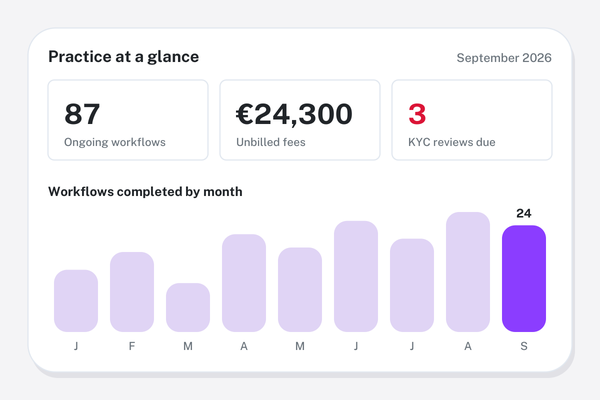
See your entire practice at a glance with real-time dashboards, reports, and AI-powered insights that highlight what needs attention.
Roles & access control
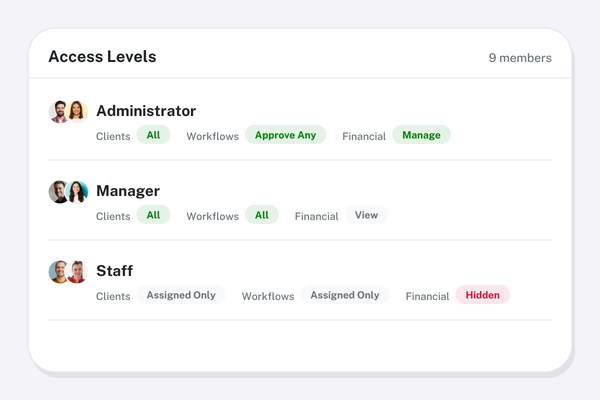
Decide who sees clients, financials and settings with granular permissions. Restrict staff to their assigned clients when you need to.
Powerful features that save you time
Workflow Management
Create and manage unlimited workflows with custom tasks, budgets, and team assignments
Client Management
Complete client profiles with contacts, company history, and unlimited custom fields
Custom Fields & Reporting
Build custom fields and filtered views for any reporting need across the platform
Time Tracking & Leave Management
Track billable hours and manage employee leave requests with approval workflows
Invoicing and Receipts
Generate professional invoices from time entries with support for multiple billing models
KYC/AML Compliance
Automated PEP screening, risk assessments, and document tracking for full compliance
Frequently asked questions
Straight answers on what ZenWorkflow is, who it is for and what it costs.
Practice management software is the system an accounting, audit, tax or law firm uses to run its client work: who each client is, which services they buy, which jobs are open and due, who is working on them, the hours recorded, and what has been invoiced and paid. ZenWorkflow is practice management software that also includes AML/KYC compliance and staff leave, so the whole firm runs from one place.
Workflows with templates, checklists, owners, budgets and due dates; client records with directors, shareholders, ownership and documents; weekly timesheets with approvals; invoices, estimates, credit notes and receipts; AML/KYC screening and risk assessments; staff leave and capacity; reporting on time, revenue, profitability and workflows; and an AI assistant that can also be reached from Claude and ChatGPT. Every feature is included at every paid tier, with AML/KYC on the Practice + AML plan.
Accounting, audit, tax, bookkeeping and advisory firms, law firms and corporate service providers, from a sole practitioner to a multi-entity group. It is built in the EU for firms doing regulated, deadline-driven work, and it supports several firms or entities from a single login.
The Practice plan is €39 per user per month, or €390 per user per year. Practice + AML adds PEP and sanctions screening, risk assessments and KYC document tracking for €58 per user per month or €580 per year. A free plan covers one user and ten clients, every paid plan starts with a 14-day free trial, and billing is in EUR or USD with no module fees and no minimum number of users.
Yes. ZenWorkflow screens clients, directors and beneficial owners against PEP and sanctions lists, runs a structured risk assessment, collects and tracks KYC documents with expiry dates, and keeps the full audit trail on the client record. Reports show which clients are overdue for review.
No, not a full client portal. ZenWorkflow shares invoices, statements, estimates and documents with clients through secure links sent by email. If a branded portal with e-signatures is the centre of how you work with clients, TaxDome or Canopy are stronger on that side, and our comparison pages say so.
Yes. Import individuals and companies, their contacts, directors, shareholders and custom fields from Excel, and bring open jobs across as workflows. Firms moving from Karbon, Canopy, TaxDome, Financial Cents or Jetpack Workflow export to CSV and import in the same way, with guided onboarding checking the mapping before go-live.
Google Drive for client files, Claude and ChatGPT through a secure connection so you can ask about clients, workflows, invoices and timesheets in plain language, SendPulse for email marketing lists, email for sending invoices, statements and documents, and a REST API for everything else. See all integrations.
Those tools are strongest on the client-facing side: portals, e-signatures and shared inboxes. ZenWorkflow is strongest on running the firm itself, with time, billing, staff leave and AML/KYC built in rather than sold as modules or left to another app, and it bills monthly per user with no annual commitment. Our side-by-side pages on TaxDome, Karbon and Canopy set out each one, including where the other tool is the better fit.
Ready to transform your practice?
Join professional firms that trust ZenWorkflow to manage their operations efficiently and compliantly.
No credit card required. Free 14-day trial.